Reassign Asset Types
Asset types can be reassigned in Asset Groups. This is a global change to the asset definition. When changing the asset type, the following tables are updated:
 BEST PRACTICE: Check these tables after reassigning asset types to double-check that everything updated correctly.
- AssetHistory.AssetType
- AssetImage.EntityType
- AssetReading.AssetClass
- CA_Address.Asset_Type
- CA_Address.Feature_Class
- CA_Asset.Asset_Type
- CA_Asset.Feature_Class
- ChangeOutOperation.AssetType
- ChangeOutOperation.DirectParentType
- ConditionHistory.EntityType
- CustEntity.EntityType
- CustEntityAlias.EntityType
- CustomLabel.TableName
- CwAsset.AssetClass
- CwAsset.FeatureClass
- CwSvrSearchDefinition.ApplyToEntity
- CwSvrSearchField.TableName
- CwSvrSearchMapLayerField.MapLayer
- CwSvrSearchResultField.TableName
- EquipChangeOut.FeatureType
- EquipmentCostAct.EntityType
- EquipmentCostPrj.EntityType
- Inspection.EntityType
- Inspection.FeatureType
- LaborCostAct.EntityType
- LaborCostPrj.EntityType
- LineItemCostAct.AssetType
- LineItemCostPrj.AssetType
- LineItemCostRpt.AssetType
- MaterialCostAct.EntityType
- MaterialCostPrj.EntityType
- PAA_Case_Entity_Type.Entity_Type
- PAttachment.EntityType
- PavementInsp.SectionClassName
- PermitAsset.AssetType
- ProjectEntity.EntityType
- ProjectEntity.FeatureType
- RequestEntity.EntityType
- RequestEntity.FeatureType
- SDyeTest.Down_Type
- SDyeTest.Pipe_Type
- SDyeTest.Up_Type
- SGenTest.Feature_Type
- SManholeInsp.Feature_Type
- SPipeInManhole.Pipe_Type
- SSmokeTest.Down_Type
- SSmokeTest.Pipe_Type
- SSmokeTest.Up_Type
- STVInspection.Down_Type
- STVInspection.Pipe_Type
- STVInspection.Up_Type
- WIP_CA_Address.Asset_Type
- WIP_CA_Address.Feature_Class
- WorkOrder.ApplyToEntity
- WorkOrderCostSummary.AssetType
- WorkOrderEntity.EntityType
- WorkOrderEntity.Feature_Type
- WoTask.EntityType
|
|
 PREREQUISITES:
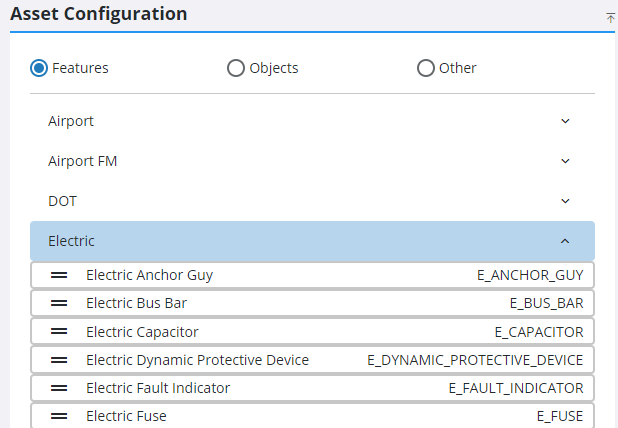
- From the home page, click GIS and click Asset Groups.
- In the Asset Configuration panel, expand an asset group and select the desired asset type you'd like to reassign.
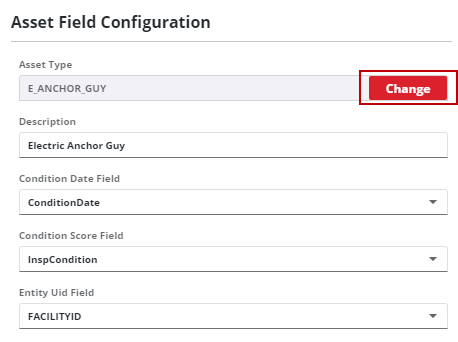
- In the Asset Field Configuration panel click Change next to the Asset Type field.
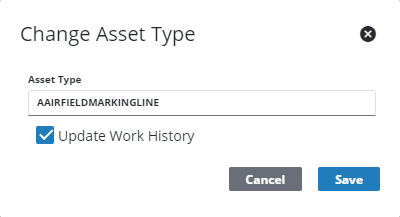
- Enter the new Asset Type name and click Save.
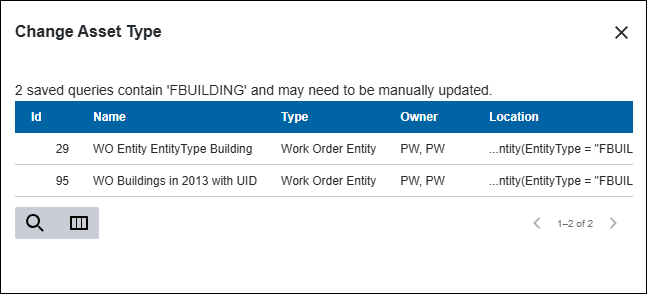
If any queries are based on the asset type, the Change Asset Type panel lists any queries need to be manually fixed after making a name change.
The work history is updated by default, unless the Update Work History check box is not selected. The following tables are updated:
- AssetAlias.AssetName
- AssetHistory.AssetType
- AssetImage.EntityType
- AssetPrintField.AssetName
- AssetTableField.TableName
- ChangeOutOperation.AssetType
- ChangeOutOperation.DirectParentType
- ConditionHistory.EntityType
- EquipmentCostAct.EntityType
- EquipmentCostPrj.EntityType
- GisServiceAsset.AssetType
- Inspection.EntityType
- Inspection.FeatureType
- LaborCostAct.EntityType
- LineItemCostAct.AssetType
- LineItemCostPrj.AssetType
- LineItemCostRpt.AssetType
- MaterialCostAct.EntityType
- MaterialCostPrj.EntityType
- PAttachment.EntityType
- RequestEntity.EntityType
- RequestEntity.FeatureType
- SDyeTest.Down_Type
- SDyeTest.Pipe_Type
- SDyeTest_Up_Type
- SGenTest.Feature_Type
- SSmokeTest.Down_Type
- SSmokeTest.Up_Type
- SManholeInsp.Feature_Type
- SPipeInManhole.Pipe_Type
- SSmokeTest.Pipe_Type
- STVInspection.Down_Type
- STVInspection.Pipe_Type
- STVInspection.Up_Type
- WorkOrder.ApplyToEntity
- WorkOrderCostSummary.AssetType
- WorkOrderEntity.EntityType
- WorkOrderEntity.Feature_Type
- WoTask.EntityType
If you need to change the data source for the asset type, complete the following:
- Once the asset type is changed, click Services from the GIS tab.
- Click Service Layers and change the Service and Layer.

