The Settings Menu
This is the tabbing order of the Settings menu.
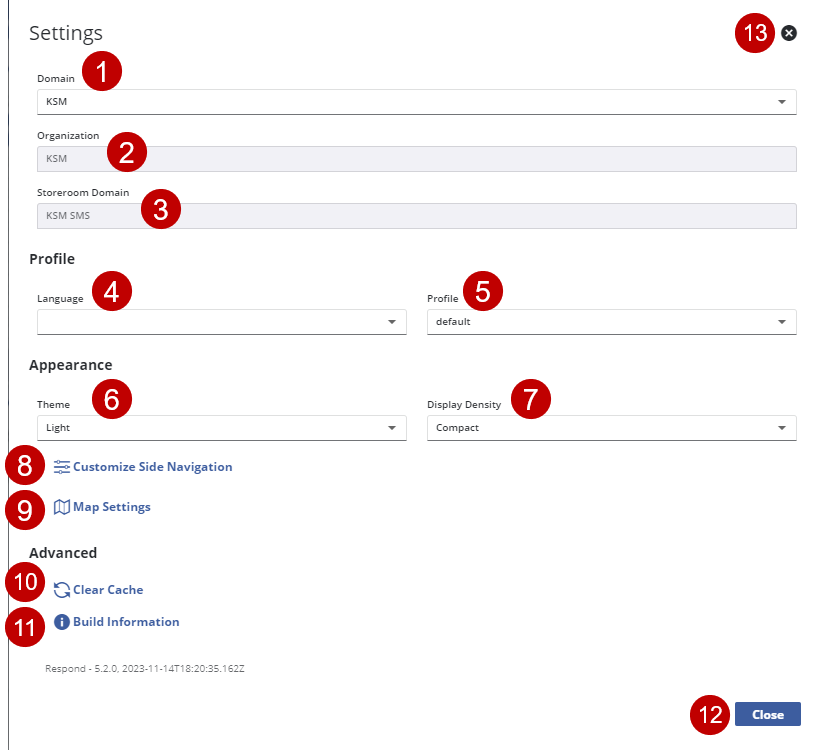
- View or switch between domains if you are assigned to multiple domains. See Switch Domains, Organizations, or Storeroom Domains for more information.
- View or switch between organizations if you are assigned to multiple organizations. See Switch Domains, Organizations, or Storeroom Domains for more information.
- View or switch between storeroom domains if you are assigned to multiple storeroom domains. See Switch Domains, Organizations, or Storeroom Domains for more information.
- Switch the Language of the app.
- Press Enter and use the arrow keys to switch between languages. Press Enter to select the language.
- Switch the Profile to change how you view the app depending on customizations made to the selected Profile.
- Press Enter and use the arrow keys to switch between profiles. Press Enter to select the Profile.
- Switch the color Theme of the app.
- Press Enter and use the arrow keys to switch between themes. Press Enter to select the theme to view.
- Switch the Display Density.
- Press Enter and use the arrow keys to switch between densities. Press Enter to select the density to view.
- Click Customize Side Navigation to customize the menu. See Customize Menus for more information.
- Map Settings. See Map Settings for more information.
- Clear cached data. See Clear Cached Data for more information.
- View additional version information.
- Close the settings menu.
- Press Enter to close the settings menu and return to the menu. See The Menu for more information.
- Close the settings menu.
- Press Enter to close the settings menu and return to the menu. See The Menu for more information.

