Take Action to Progress the Workflow
You can take action on
 Take Action on an Associated Asset
- Tap a work activity.
- Tap Take Action.
- Tap the desired action to take it.
- Accept: Tap to accept the work activity step.
- Decline: Tap to decline the work activity step.
- Approved: Tap to approve the work activity step.
- Revise: Tap to revise the work activity step.
- Submit: Tap to submit the work activity step.
- Request Comment: Tap to request for a comment on the work activity.
Parent Work Order Completion Requirements
When managing parent work orders with linked child or related work items, parent completion behavior depends on the relationship link type assigned to the activities:
- Standard Child or Related Work Activities: Linking a child or related work activity directly within the mobile app creates an organizational relationship for tracking.
- Requires or Required By Work Activities:
- If a linked activity is designated as a Requires relationship in Respond, it creates a strict relationship dependency, meaning that the parent work order can only be completed if the Requires activity is completed.
- If a linked activity is designated as a Required By relationship in Respond, it creates a strict relationship dependency, meaning that work on the parent work order can only be started if the Required By work activity is completed.
 IMPORTANT: The Requires and Required By relationship types can only be set in Respond, they cannot be applied when creating new related or child activities directly in the app. See Link a Work Activity in the Respond Guide for Trimble Unity Maintain and Trimble Unity Permit for more information.
How Dependencies Block Parent Completion
If a parent work order has one or more incomplete Requires or Required By work activities:
- Completion Check: When you attempt to progress the parent activity to a status in the Completed status group (e.g., Complete, Closed, Finished), the app validates the status of all linked dependencies.
- Blocked Status Update: If any linked dependent activity remains in an open or incomplete state, the app prevents the parent activity from advancing to the completed status.
- Incomplete Activity Highlighting: An alert appears on your screen, and the required incomplete activities are highlighted in the linked items list so you can easily identify which activities must be finalized first. The work activity details page also displays a red indicator on the relevant required work activity field.
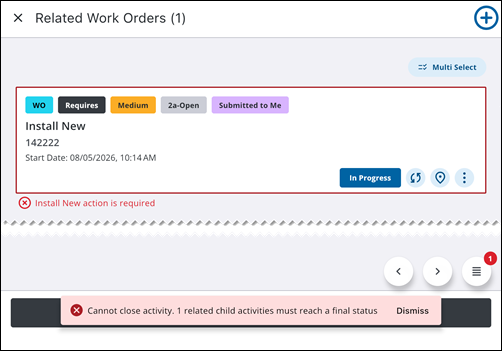
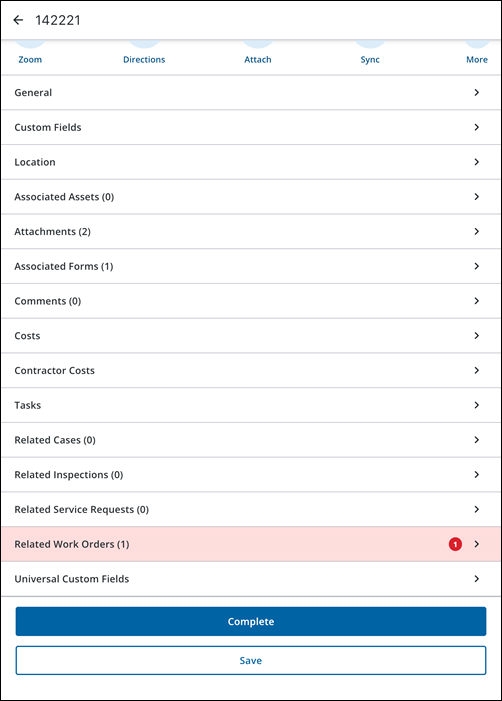
To resolve the block, complete all highlighted required activities (or perform their required workflow actions) before completing the parent activity.