Connect to an External GNSS Receiver
Trimble Unity Field supports integrated receivers in iOS, Android, and Windows devices that provide low accuracy position information. To receive high accuracy position data when using Trimble Unity Field, connecting to an external Global Navigation Satellite System (GNSS) receiver is required. This connection is configured outside of the Trimble Unity Field app using Trimble Mobile Manager (TMM).
|
|
 PREREQUISITES:
 Configure the Connection to Trimble Mobile Manager in Trimble Unity Field
Complete the following to connect to Trimble Mobile Manager within the Trimble Unity Field app:
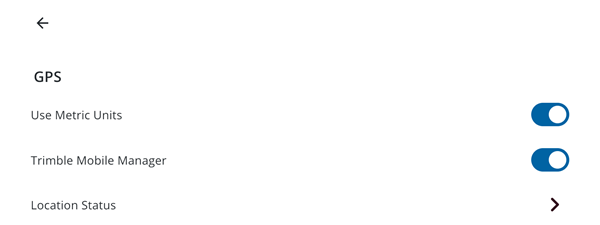
- Tap Settings.
- Tap GPS.
- Tap to turn on the Trimble Mobile Manager switch.
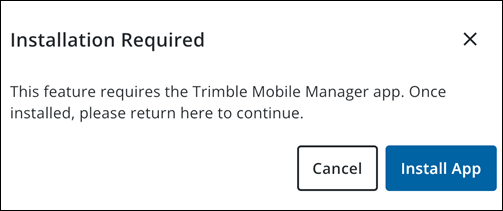
 NOTE: NOTE:
|
 Configure the GNSS Receiver in Trimble Mobile Manager
In Trimble Mobile Manager, you can now configure the GNSS receiver.
- Configure the connection in Trimble Mobile Manager. See the Trimble Mobile Manager Help Portal website or contact your system administrator for more information on how to configure a receiver.
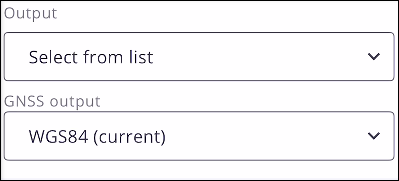
 IMPORTANT: IMPORTANT: Trimble Unity Field requires positions to be in a WGS84 (current) coordinate system. To ensure the most accurate feature and data collection in the app, the GNSS Output and Geoid configuration settings in Trimble Mobile Manager must be defined as follows:
|
- If needed, configure real-time corrections. See Configure Real-time Corrections on the Trimble Mobile Manager Help Portal website for more information.
|
|
- After configuring all settings in Trimble Mobile Manager, return to the Trimble Unity Field app.
- Tap Settings.
- Tap GPS.
- To confirm the GNSS receiver is connected, tap Location Status. From here, you can view the following details and position metadata:
NOTE: After the GNSS receiver is connected, you can also view a GNSS status bar at the bottom of the map, which reflects the GNSS data coming from the DA2 and the Catalyst™.
- Receiver: The type and model of the connected GNSS receiver.
- Battery: The current battery level of the GNSS receiver.
- Number of Satellites: The number of satellites currently being used to determine your position.
- Position: Displays details about position metadata.
- Fix Type: The type of position solution calculated by the receiver.
- Latitude: Your current latitude coordinate.
- Longitude: Your current longitude coordinate.
- Height above Ellipsoid: Your height above the reference ellipsoid.
- Altitude (MSL): Your altitude above mean sea level (MSL).
- Antenna Height: The height of the GNSS receiver's antenna above the ground.
- Vertical Accuracy: The estimated accuracy of the vertical component of your position.
- Horizontal Accuracy: The estimated accuracy of the horizontal components of your position.
- Tilt Compensated Position: Indicates whether the position has been corrected for the tilt of the GNSS receiver's antenna. This feature, which relies on TIP™ technology (Trimble Inertial Platform™ technology) ensures accurate measurements even if the receiver is not perfectly upright.
- Tilt: The current tilt angle of the GNSS receiver's antenna.
- Tilt X: The tilt angle of the antenna along the X-axis.
- Tilt Y: The tilt angle of the antenna along the Y-axis.
- Real Time Correction Status: Displays the status of any real-time correction services being used to enhance position accuracy.
- RTK Status: The status of the Real Time Kinematic (RTK) positioning solution.
- Correction Age: The age of the last received correction data, if applicable.

