Create a Requisition
Requisition allows you to keep a record of material being ordered, predetermined suppliers, unit of measure, and order quantities as well as streamline the receiving process. Requisitions keep track of supplier purchases, quantities ordered, cost of material, backorders, and types of requisitions.
|
|
 PREREQUISITES:
- Click Requisition from the menu.
- On the Material panel, select a Storeroom from the drop-down list. This changes the list of materials. Materials can only be selected from one storeroom at a time.
 TIP: You can filter the list of records displayed. See Filter Records for more information.
-
Select materials from the list. See Search Materials for more information on using the search tabs to find materials.
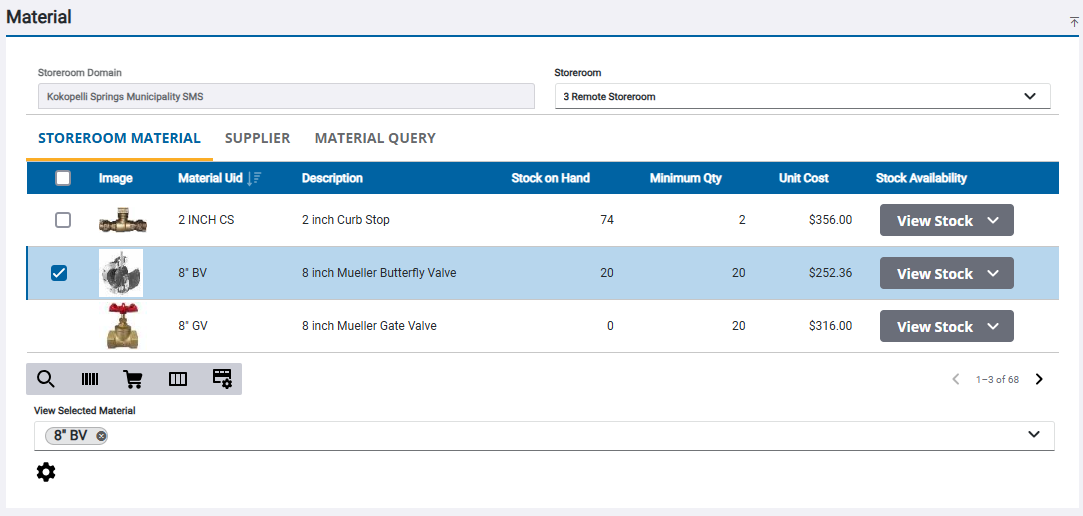
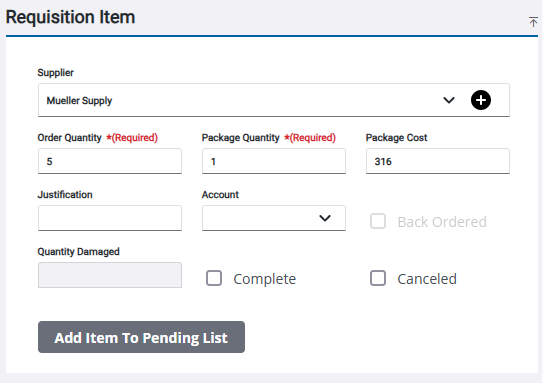
 NOTE: By selecting a material, the Supplier, Order Quantity, Quantity in Package, and Package Cost fields automatically populate.
- Enter the information in the Requisition Item panels to requisition the material. See Requisition Transaction Fields for more information.
- Click Add Item to Pending List to add the materials to the Pending Requisition panel.
The material is added to the Pending Requisitions panel. See Navigate the Pending Requisition Panel for more information.
- Click Create Requisition on the Pending Requisition panel to process all the requisitions listed.

- Click Sign or Close on the Transaction Complete panel.
If you don't wish to sign the transaction now, see Capture a Signature on an Existing Requisition for more information.