Quick Capture a Work Activity Location Using GNSS
You can quick capture a work activity location using your GNSS position.
 NOTE: If an external GNSS receiver is not connected, the location is captured based on your device's internal GPS. See Connect to an External GNSS Receiver for more information on connecting a GNSS receiver and ensuring the most accurate capture.
- Open a work activity.
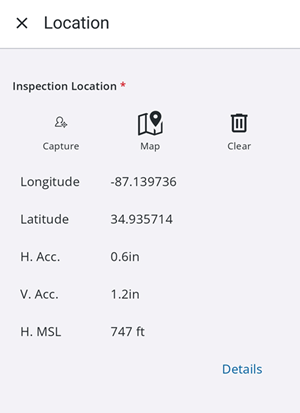
- Tap Location.
- Tap Capture.
The GNSS location is captured. Once the location is captured, relevant GNSS metadata fields (e.g., accuracy, fix type, date/time) are automatically saved and populated.
If using a floor-aware map, the Level Id and Facility Id fields automatically populate based on your current GNSS position and the selected floor on the map. See Select Floor Tool for more information.