Manage Linked Activities
You can view, create, and update related and child work activities from a parent work activity. Linked work activities are grouped by workflow, and you can filter them by workflow and status category. You can progress workflows directly from each summary card, update multiple work activities at once, and see which required work activities are blocking the parent from being completed.
Relationship Types
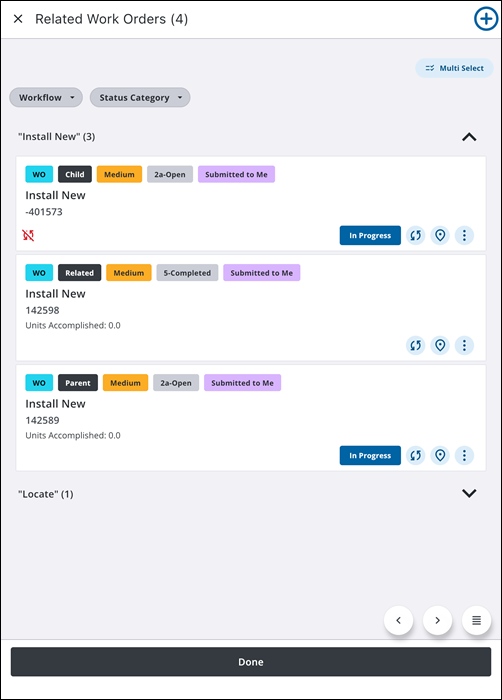
There are several different types of work activity relationship links. These are displayed in the app using badges (e.g. Child for a child work activity, Related for a related work activity). The link type determines how the activities interact and whether completion rules apply:
- Parent Activity: The primary work activity. For work orders, parent completion behavior depends on the relationship link type assigned to related or child activities.
- Child Activity: Establishes a hierarchical parent-child relationship. Child activities support card-level workflow execution and bulk actions.
- Related Activity: Links work orders, inspections, service requests, or cases for general reference without strict parent-child dependencies. Related activities support card-level workflow execution and bulk actions.
- Requires Activity: Designated in Respond. The primary work activity cannot be completed until the Requires work activity is completed. See Link a Work Activity in the Respond Guide for Trimble Unity Maintain and Trimble Unity Permit for more information.
- Required By Activity: Designated in Respond. The primary work activity cannot be begun until the Required By work activity is completed. See Link a Work Activity in the Respond Guide for Trimble Unity Maintain and Trimble Unity Permit for more information.
 Add a Related or Child Work Activity
You can create a related or child work activity from the related list page.
- Open a parent work activity.
- Tap Related Cases, Related Inspections, Related Work Orders, or Related Service Requests depending on the desired related or child work activity you would like to create.
- Tap the Add icon.
A message appears asking if you want to create the related work activity on the same associated asset.
- Tap Yes.
- Select an Asset Group, Asset Type, and Template.
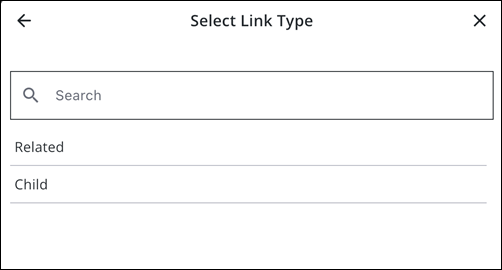
- On the Select Link Type panel, tap Related or Child.
- Enter information into the desired fields for the work activity.
- Tap Create.
The child or related work activity is created and appears under its respective related work activity field with a badge indicating the linked type.
Summary Card Details and Direct Actions
You can perform the following actions on a child or related work activity directly from its summary card in the list view without opening its details page:
- Progress the Workflow: Tap the workflow action button directly on the card (such as Hydrant Data or Mark as Completed) to advance the workflow status or automatically launch an associated smart form. If updating multiple compatible activities, tap Multi Select, select the activities, and tap Take Action.
- Sync icon: Tap the sync icon to perform a manual sync for that specific activity when pending local edits or status updates need to be uploaded to the server. A Not Synced icon indicates changes queued on your device.
- Map icon: Tap the map pin icon to highlight the child or related work activity on the map and display its summary card.
- More Actions icon: Tap the three vertical dots to open the menu and select from the following options:
- Directions: Tap to launch your device's default navigation application and receive driving directions to the work location.
- Locate: Tap to use GPS positioning to view real-time distance and bearing to the activity location.
- Web: Tap to open the work activity record directly in Respond.
Group and Filter Linked Activities by Workflow and Status Category
When viewing related or child work activities, you can group and filter them by workflow and status category. This provides immediate situational awareness and ensures that field crews can focus on the work activities that require attention, streamlining navigation across complex related tasks and reducing operational clutter.
Related work activities are grouped by workflow. Each group shows the workflow name and the number of related work activities in that group.
From this page, you can perform the following actions:
- Collapse or Expand: Tap a group header to expand or collapse that group.
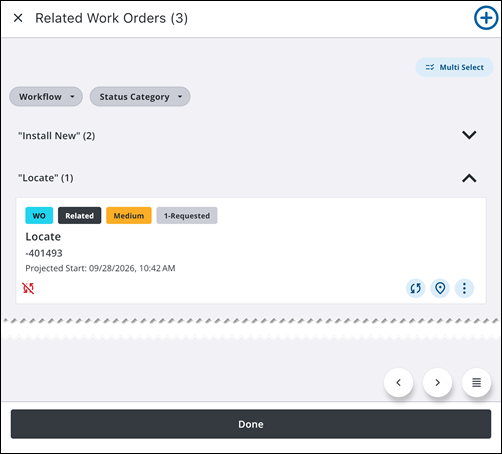
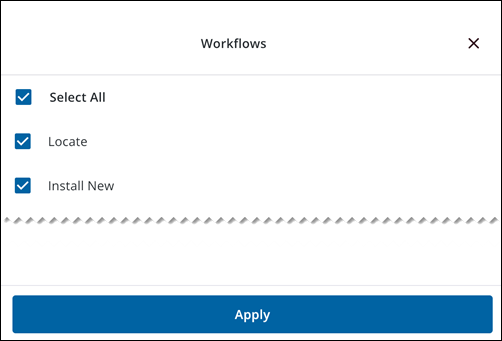
- Workflow: Tap Workflow, select one or more workflows, and tap Apply. Only related work activities in the selected workflows appear. They remain grouped by workflow.
- Status Category: Tap Status Category, select one or more status categories, and tap Apply. Only related work activities that match at least one selected status category appear.
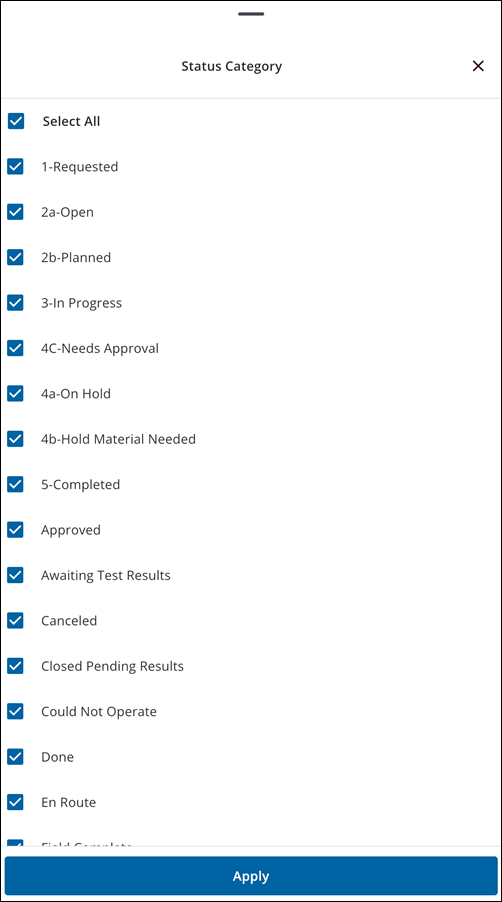
- Clear Filters: Tap the X on an active filter chip to clear that filter.
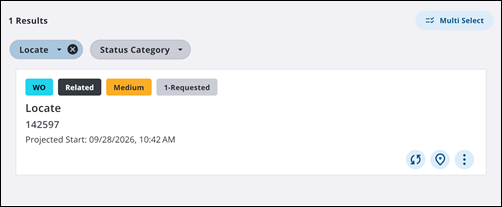
Perform Linked Work Activity Workflow Actions
You can progress the workflow of a related or child work activity directly from its summary card in the list view without opening its details page.
- On the related or child activity summary card, tap the appropriate action button to progress the workflow.
- Depending on how the workflow is configured in Admin, taking action triggers one of the following scenarios:
- Status Progression: The status badge updates automatically on the summary card to reflect the new workflow stage.
- Associated Form Launch: A linked smart form automatically opens on the page for immediate editing. Complete the required fields and tap Save to return to the related list page.
- Confirmation Prompt: If a confirmation message is configured for the workflow step in Admin, a pop-up prompt appears on the page. Review the instructions or warning text and tap the confirmation button to complete the transition.
- If multiple workflow choices or split progression paths are available, tap Take Action to open the menu options, evaluate the choices, and tap the correct action button (for example, tap Complete to finalize a work order).
- Perform a manual sync to immediately upload your status changes and completed forms to Respond.
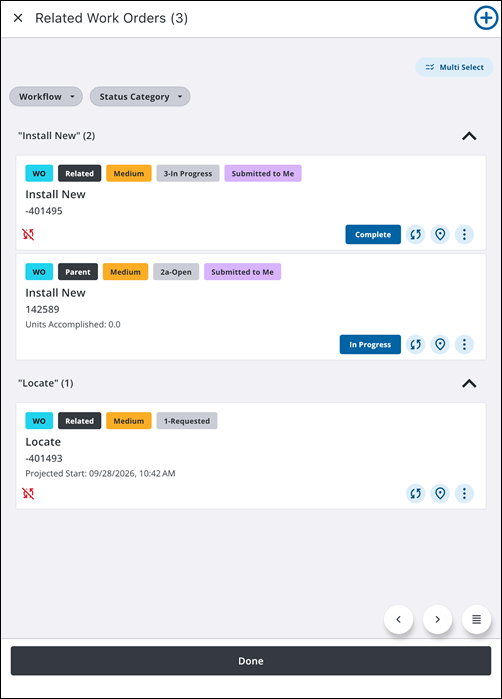
Perform Bulk Actions on Linked Work Activities
When multiple related or child work activities share the same available workflow action (such as Mark as Completed) and that action does not require a mandatory smart form, you can update them simultaneously.
- On the related list page, tap Multi Select.
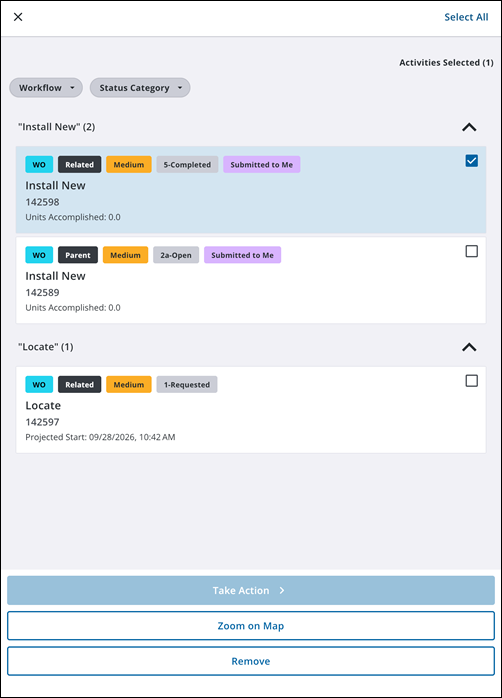
- Select the compatible linked work activities or tap Select All.
- Choose from the following bulk options:
- Take Action: Tap the shared workflow action. The app performs the action across all selected child activities and updates their statuses immediately in the list view.
- Zoom on Map: Tap to zoom to all selected work activities on the map.
- Remove: Tap to disconnect the selected related work activities from the work activity.
Validation Messages
You can only perform bulk updates when related or child work activities share matching workflow stages and actions. The following validation messages may appear during bulk actions:
- Syncing Previous Actions: Appears if one or more selected items have changes currently syncing to the server. Tap Dismiss and wait for the system to finish updating their statuses or perform a manual sync before completing a new bulk action.
- Cannot Bulk Update: Appears if the selected activities are in different stages of their workflow or do not share the exact same next-step action. Tap Dismiss to close the message, then select items with matching workflows or process them individually.
- Form Entry Required: Appears if the selected activities share the same workflow action, but some require a specific smart form to be filled out before they can be moved to the next step. You cannot bulk execute actions that require individual form data. See Associated Forms for more information.
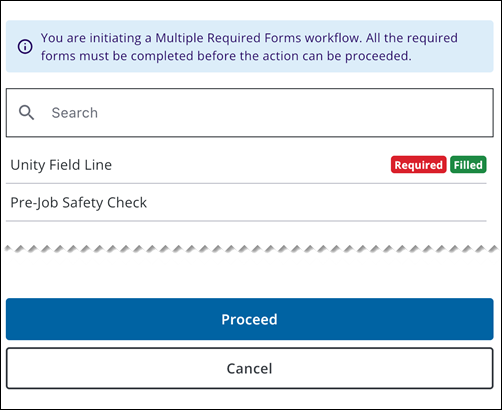
- Multiple Required Forms: If the workflow step requires more than one form, a list of forms appears. Tap each form marked Required, complete it, and tap Proceed when all required forms show Filled.
Parent Work Order Completion Requirements
When managing parent work orders with linked child or related work items, parent completion behavior depends on the relationship link type assigned to the activities:
- Standard Child or Related Work Activities: Linking a child or related work activity directly within the mobile app creates an organizational relationship for tracking.
- Requires or Required By Work Activities:
- If a linked activity is designated as a Requires relationship in Respond, it creates a strict relationship dependency, meaning that the parent work order can only be completed if the Requires activity is completed.
- If a linked activity is designated as a Required By relationship in Respond, it creates a strict relationship dependency, meaning that work on the parent work order can only be started if the Required By work activity is completed.
 IMPORTANT: The Requires and Required By relationship types can only be set in Respond, they cannot be applied when creating new related or child activities directly in the app. See Link a Work Activity in the Respond Guide for Trimble Unity Maintain and Trimble Unity Permit for more information.
How Dependencies Block Parent Completion
If a parent work order has one or more incomplete Requires or Required By work activities:
- Completion Check: When you attempt to progress the parent activity to a status in the Completed status group (e.g., Complete, Closed, Finished), the app validates the status of all linked dependencies.
- Blocked Status Update: If any linked dependent activity remains in an open or incomplete state, the app prevents the parent activity from advancing to the completed status.
- Incomplete Activity Highlighting: An alert appears on your screen, and the required incomplete activities are highlighted in the linked items list so you can easily identify which activities must be finalized first. The work activity details page also displays a red indicator on the relevant required work activity field.
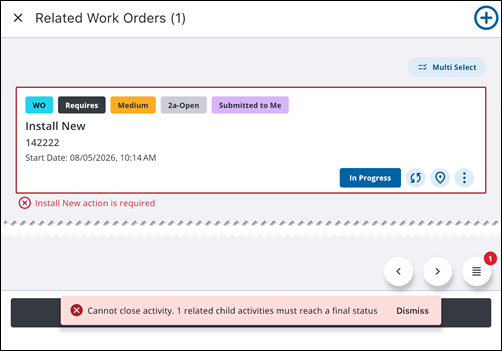
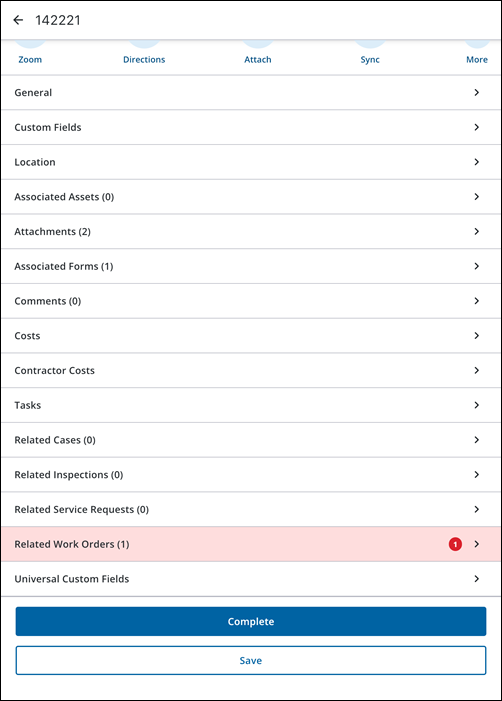
To resolve the block, complete all highlighted required activities (or perform their required workflow actions) before completing the parent activity.

