View and Select Assets on the Map
You can select assets from the map by drawing a rectangle using the Select icon or by tapping on the map.
If you navigate to the map from a work activity, the activity icon is displayed on top of the GIS assets. If you navigate to the map from an asset, the asset is displayed on top of any work activity icons.
When selecting assets on a floor-aware map, the results are automatically filtered to show only the items on your currently selected level.
 NOTE: You can choose which layers and work activities on the map are selectable. See Toggle the Visibility and Selection of Layers for more information.
 From the Map
Assets appear as icons on the map that you can view and select.
- On the map, tap the Select icon.

- Draw a rectangle over the Asset icon.
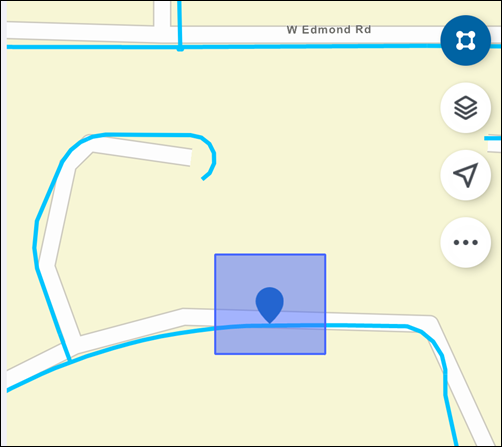
NOTE: You can also tap on an asset icon to select it. When a line asset is selected, the line is highlighted. When an area asset is selected, the asset marker displays in the center of the area asset.
- On the Assets panel, tap the desired asset type.
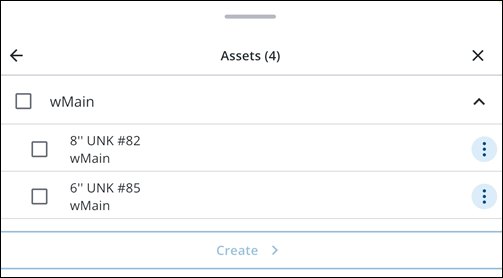
- Tap an asset.
The asset details page opens.
From a Summary Card
- On a summary card, tap the Map icon.
The Asset icon is highlighted on the map.
From a Work Activity
You can open an asset from the asset details page. See View Asset Details for more information.
|
|
- Open an asset.
- Tap Zoom to zoom to the selected asset.
The map opens and the work activity pin is highlighted, along with any
You can perform the following actions from this view:
- Asset Card: Tap to return to the asset details page.
- Create: Tap to create a work activity associated to the asset.
- Map icon: Tap to view the asset on the map.
- More: Tap to access more actions.
- Locate: Tap to locate the asset.
- Directions: Tap to open driving directions to the asset.
- Web: Tap to open the asset in the web application.
NOTE: On floor-aware web maps, viewing an activity or asset (such as tapping the Map icon or the Zoom icon) automatically centers the map on the building and switches the view to the corresponding level. This ensures you are viewing the data in its correct vertical context. See Select Floor Tool for more information.

