Single Sign-on Guide for Trimble Unity Maintain and Trimble Unity Permit Introduction
With the introduction of Trimble Identity, Trimble Unity is transitioning from the traditional Single Sign-on (SSO) model that was connected with your ArcGIS Identity, to the new Trimble ID (TID) model that allows you to federate your enterprise provider directly with Trimble ID, and then have a separate GIS integration feature that works after the Trimble ID login. After the first initial log in with Trimble ID, the system automatically signs you in to ArcGIS to streamline the log in process. While both configurations are currently supported, they should be mutually exclusive setups. Organizations should select one primary method for their site.
Refer to the following table to see the possible configurations in Trimble Unity.
| Trimble ID Federation |
Trimble ID No Federation |
Traditional Single Sign-on (Legacy) | |
|---|---|---|---|
| Primary Identity | Trimble ID |
Trimble ID |
ArcGIS Identity |
| Direct Federation | Enterprise identity provider (IdP) ↔ Trimble ID |
|
Unity Login ↔ ArcGIS Identity |
| GIS Connection | Handled through separate GIS integration feature |
Handled through separate GIS integration feature |
Direct ArcGIS login/identity |
| Implementation | Use this for a unified Trimble ecosystem and streamlined login using an existing identity provider (IdP). |
Use this for a unified Trimble ecosystem and streamlined login using a Trimble ID login. |
Use this only if maintaining existing legacy GIS-centric workflows. |
 Trimble ID Federation
With the introduction of Trimble ID federation, an organization can use their existing enterprise identity provider (IdP) to log in to Trimble ID. Trimble ID federation can be created with most established enterprise IdP solutions, such as Microsoft Entra ID (formerly Azure AD), ADFS, Okta, Google, using either Open ID Connect (OIDC) or SAML protocols. Additionally, GIS integrations can be set up in Trimble ID to automatically log in to ArcGIS at the same time the user logs in to Trimble ID.
- See Trimble ID Federation to set up Trimble ID federation.
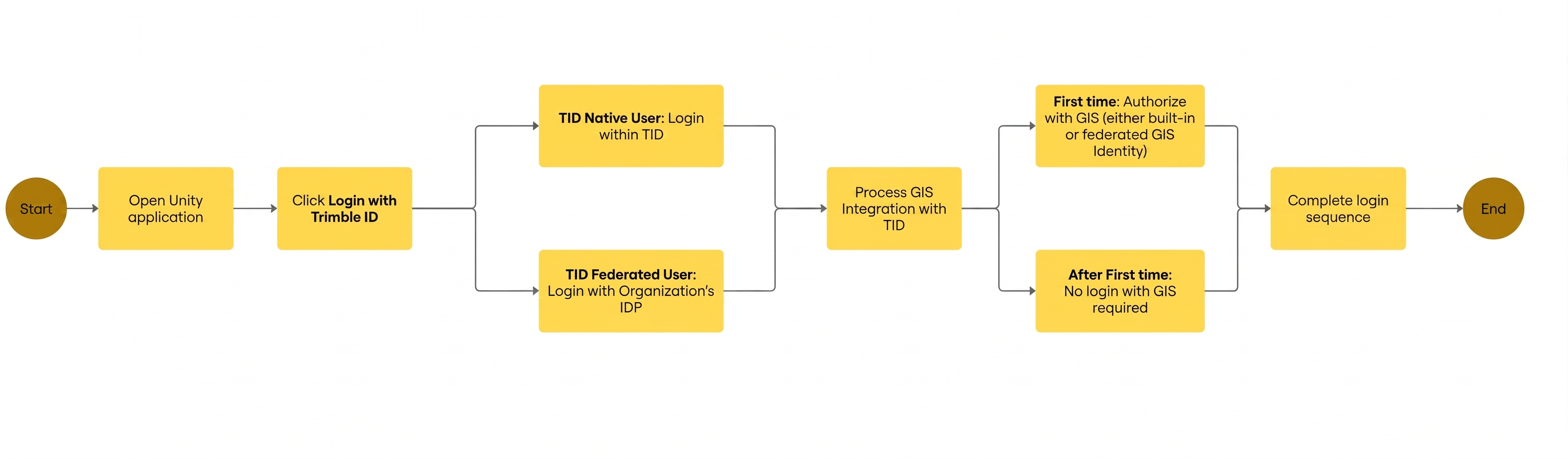
Trimble ID with GIS Integration Login Workflow (with and without Trimble ID Federation)
The Trimble ID with GIS integration login workflow begins with opening the application and logging in with Trimble ID. Depending on if the site is setup with federation or not, the steps will differ slightly. Once you're logged in, any GIS integrations set up are processed. If it is the first time logging in, you'll need to authorize with GIS. After that you won't need to authorize the GIS. See Log In Examples to see the exact workflow.
Single Sign-on (Traditional Setup)
Single Sign-on allows users to log in to Trimble Unity using their ArcGIS Online or Portal for ArcGIS credentials, which is helpful for administrators who want to manage user passwords in ArcGIS Online or Portal for ArcGIS rather than Trimble Unity. Once Single Sign-on is configured for the site, the Collapse Default Login preference in Admin should be turned on. See Configure Global Preferences in the Admin Guide for Trimble Unity Maintain and Trimble Unity Permit for more information.
- See Traditional Single Sign-on through ArcGIS Credentials to set up Single Sign-on.
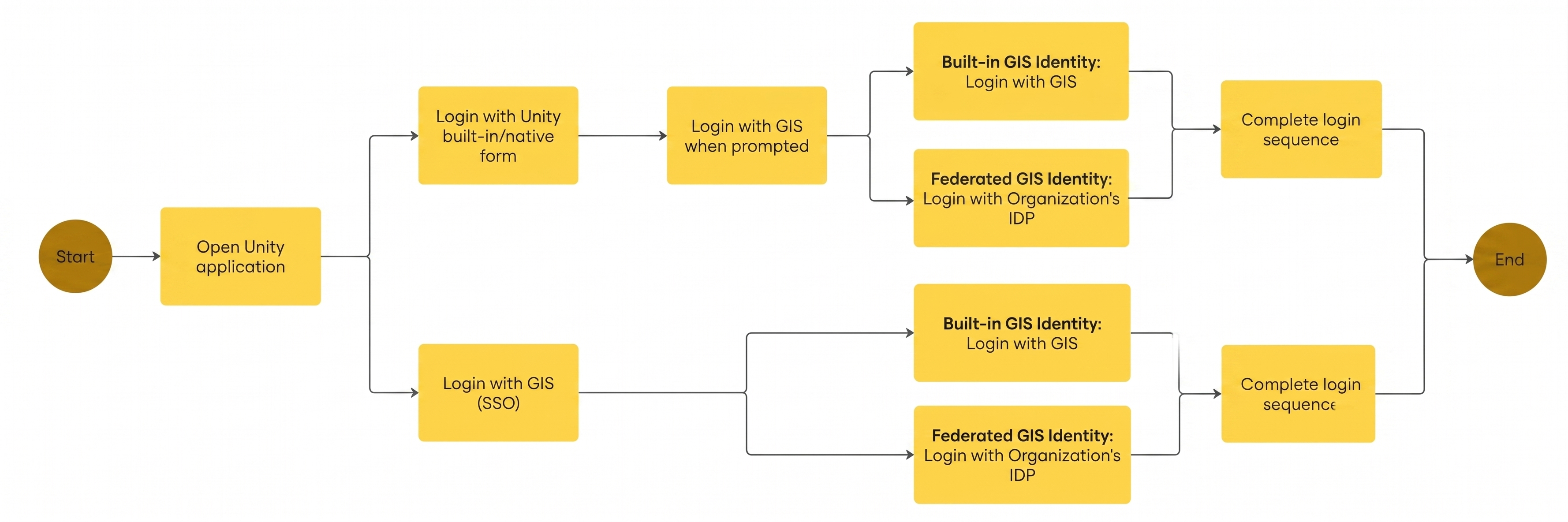
Traditional Trimble Unity Maintain and Permit Login Workflow (with and without Single Sign-on)
The traditional login workflow begins with opening the application and logging in. Depending on if the site is set up with Single Sign-on or not, the steps differ slightly. If you don't have Single Sign-on configured, you'll have to log in to the GIS when prompted.
 NOTE: All images were taken on a Google Chrome browser steps, fields, and images are based on the latest version of Trimble Unity. There may be slight differences (i.e., functionality, fields, color branding, etc.) depending on the current version of Trimble Unity you are on.