Add a Case Template
Case templates are the foundation upon which Trimble Unity Permit is built. Templates include predefined items such as fees, workflow tasks, and roles to assist users to easily create a case based off of the template. By creating a template, you save the user from having to find and add these items to each new permit or license case individually.
|
|
 PREREQUISITES:
 NOTE: Multiple records can be added or edited at the same time. See Perform a Bulk Export or Bulk Import for more information.
- From the home page, click Permitting and click Case Templates.
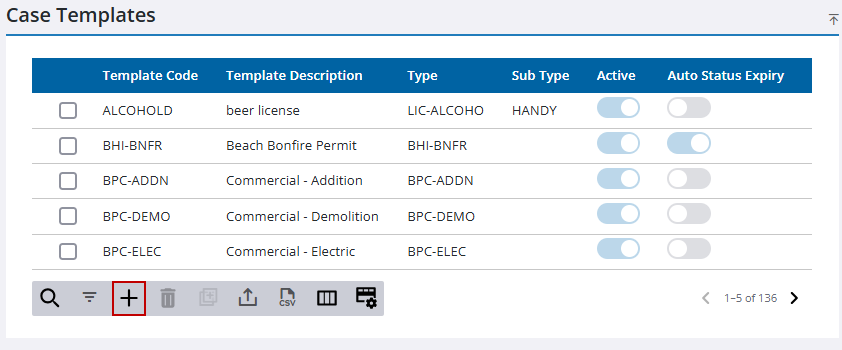
- On the Case Templates panel, click Add record.
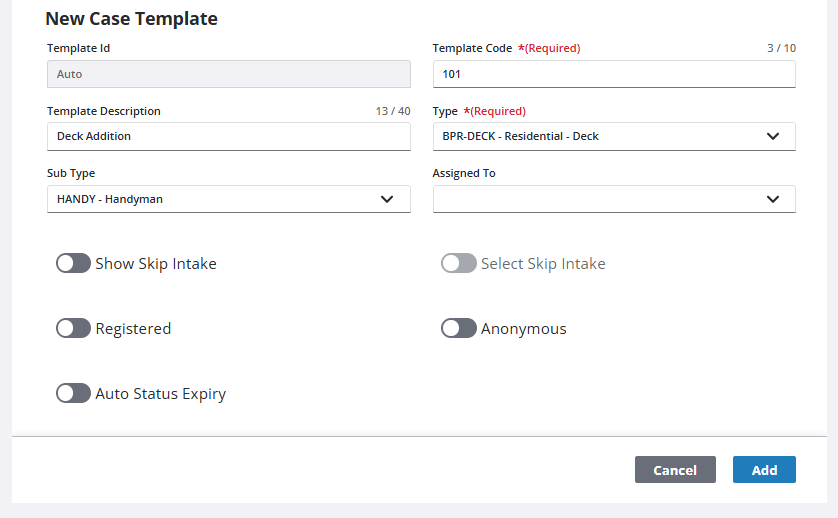
- In the New Case Template section, enter a code in the Template Code field. This code appears in drop-down lists and is limited to 10 characters.
- Select a Type from a predefined list of all existing template types.
- If desired, use the Assigned To drop-down list to automatically designate a user to handle cases generated from this template.
- Enter additional information in the remaining optional fields as desired.
See Template Details Panel for more information on the available fields.
- Click Add.
See Configure Controls on a Case Template, Configure Default Setup on a Case Template, Configure Required Items on a Case Template, Configure Automation on a Case Template, Configure Attachment Labels, Configure Escrow Fees, Configure Cloning Options on a Case Template, Configure Public Access Options on a Case Template, Configure Reports on a Case Template, and Configure GIS Data on a Case Template for more information on completing a case template.

